What is new on Article Factory and latest in generative AI world

Microsoft AI Lead Mustafa Suleyman Defends Windows 11 AI Amid Growing Criticism

Microsoft AI Lead Mustafa Suleyman Defends Windows 11 AI Amid Growing Criticism
Microsoft’s AI head Mustafa Suleyman took to X to push back against a wave of criticism targeting the company’s AI integration in Windows 11. Suleyman warned that many skeptics are “cynics” who find the progress “underwhelming,” insisting that the ability to hold fluid conversations with a powerful AI and generate images or video is “mind‑blowing.” Critics have highlighted missing basic functionality, recurring bugs, and privacy concerns surrounding AI agents like Copilot. The debate underscores tension between Microsoft’s rapid AI rollout and user expectations for reliability and security. Read more →

Microsoft’s Copilot Claim Sparks Social Media Backlash Over Windows 11 AI Features

Microsoft’s Copilot Claim Sparks Social Media Backlash Over Windows 11 AI Features
Microsoft posted a brief message on X boasting that its Copilot could finish code before a user finishes a coffee. The post quickly attracted a wave of critical replies, with many users linking the claim to ongoing frustrations with Windows 11 updates and bugs. Commentators questioned whether AI‑generated code was contributing to stability issues and expressed broader concerns about reliance on artificial intelligence for software development. The episode highlights the tension between Microsoft’s push for AI integration and the skeptical response from the tech community. Read more →

Microsoft Introduces Experimental AI Agent Features in Windows 11

Microsoft Introduces Experimental AI Agent Features in Windows 11
Microsoft has rolled out a new Windows 11 Insider build that adds an optional "experimental agentic features" toggle. The update enables Copilot Actions, an AI‑driven assistant that can handle tasks such as file organization, meeting scheduling, and email composition. While the feature aims to boost productivity, Microsoft acknowledges novel security risks and has built safeguards, including separate user accounts for agents, mandatory user approvals, activity logs, and observable actions. The feature is currently disabled by default and limited to early test builds. Read more →

Microsoft Unveils AI‑Powered “Agentic OS” with Taskbar Integration

Microsoft Unveils AI‑Powered “Agentic OS” with Taskbar Integration
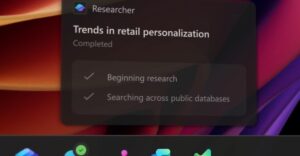
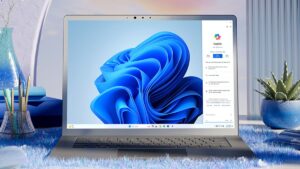
Microsoft is transforming Windows into an “agentic OS” by embedding AI agents directly into the Windows taskbar. The new capabilities let users launch Microsoft 365 Copilot and third‑party agents from the taskbar, monitor their progress, and receive notifications when tasks are completed. Developers gain a standardized framework for building agents that can access tools and other agents securely. Additional AI features are being rolled out across Windows, including Copilot integration in File Explorer, writing assistance, Outlook summaries, and a fluid dictation tool. The rollout is opt‑in, giving users control over their AI experience. Read more →

Microsoft Prepares AI Agents for Windows 11 with Experimental Agent Workspaces

Microsoft Prepares AI Agents for Windows 11 with Experimental Agent Workspaces
Microsoft is rolling out an experimental feature called agent workspaces in Windows 11, allowing AI agents to run in a sandboxed environment separate from the user’s account. The design emphasizes security and privacy by granting agents limited permissions to specific apps and files. Early testing will involve a small group of insiders, with plans to expand as feedback is gathered. Microsoft highlights the ability to manage each agent’s access, maintain logs of activity, and protect against risks such as hallucinations or prompt injection. Sample agents include Copilot Actions for routine tasks and Manus AI for more complex projects. Read more →

Microsoft Windows exec addresses AI rollout criticism and pledges usability improvements

Microsoft Windows exec addresses AI rollout criticism and pledges usability improvements
Pavan Davuluri, Microsoft’s head of Windows, responded to the backlash over AI integration in Windows 11. He acknowledged that the operating system still has work to do on everyday usability, reliability, and performance, and said the team is listening to extensive user feedback. While he highlighted the company’s focus on fixing inconsistent dialogs and power‑user experiences, he did not address concerns about advertising and ecosystem‑driven prompts. The response also drew attention to a recent Copilot demo that many users found confusing, underscoring the challenges Microsoft faces in balancing new AI features with a stable user experience. Read more →

YouTube Refutes AI Role in Recent Tech Tutorial Removals

YouTube Refutes AI Role in Recent Tech Tutorial Removals
YouTube has denied that artificial intelligence was used to remove recent tech tutorial videos, a claim that sparked concern among creators. The controversy centered on a creator known as White, whose channel grew to around 330,000 subscribers after a popular video showing a Windows 11 workaround. White speculated that AI might be influencing moderation but cited a seemingly automated chatbot as evidence. He noted past instances where videos were flagged but quickly reinstated after human review. The uncertainty has left creators uneasy about what content may be subject to removal. Read more →

Microsoft Adds Optional “Ask Copilot” Box to Windows 11 Taskbar

Microsoft Adds Optional “Ask Copilot” Box to Windows 11 Taskbar
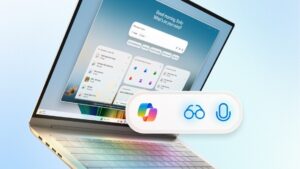
Microsoft’s latest Windows 11 preview introduces an optional “Ask Copilot” box that replaces the traditional taskbar search field. The new box lets users type queries that are handled by the Copilot AI, while still offering a way to access classic Windows Search. The feature includes quick‑access icons for Copilot Vision and voice commands, and it is disabled by default, requiring users to enable it through Settings > Personalization > Taskbar > Ask Copilot. Microsoft emphasizes that the AI uses existing Windows APIs and does not gain additional access to personal files. Read more →

Microsoft Introduces ‘Mico’, a Human‑Centered Animated Assistant for Copilot

Microsoft Introduces ‘Mico’, a Human‑Centered Animated Assistant for Copilot
Microsoft is adding a visual, animated companion named Mico to its Copilot AI in Windows 11. Designed as an expressive, customizable blob with a face that reacts to user interactions, Mico aims to make the chatbot feel more human‑centered. The move recalls earlier Microsoft assistants such as Clippy, Microsoft Bob, and Rover, but ties the familiar visual style to modern large‑language models and voice controls. Microsoft hopes the new interface will overcome past criticisms of its digital assistants by providing richer context awareness and a friendlier user experience. Read more →

Microsoft Unveils Mico, the New AI Companion for Copilot Voice Mode

Microsoft Unveils Mico, the New AI Companion for Copilot Voice Mode
Microsoft has introduced Mico, a virtual AI character that appears as a responsive orb in Copilot's voice mode. Designed to react with facial expressions as users speak, Mico is enabled by default in the United States, United Kingdom, and Canada, with an option to turn it off. The companion includes a memory feature that recalls user‑specific facts and a Learn Live mode that acts as a Socratic tutor, using interactive whiteboards and visual cues for students and language learners. Mico signals Microsoft’s broader push to give its AI a lasting identity and to encourage people to talk to their PCs. Read more →

Windows 11 Gaming Copilot Sparks Privacy and Performance Debate Among PC Gamers

Windows 11 Gaming Copilot Sparks Privacy and Performance Debate Among PC Gamers
PC gamers are questioning the new Gaming Copilot feature in Windows 11 over potential privacy risks and its impact on frame rates. While Microsoft’s FAQ states that screenshots are not stored for model training, a forum post suggested the default settings might capture gameplay for AI training. Tests show a modest dip in performance when the feature is active, especially on lower‑end handheld devices. The controversy highlights the tension between AI‑driven assistance and gamer expectations for privacy and optimal performance. Read more →

Microsoft Tests AI‑Powered Animation and Generative Edit Features in Windows Paint

Microsoft Tests AI‑Powered Animation and Generative Edit Features in Windows Paint
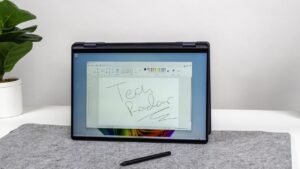
Microsoft is experimenting with two new artificial‑intelligence capabilities inside the Windows Paint app. The "Animate" feature lets users turn a static image or sketch into a short animation without needing a prompt, while the "Generative Edit" tool applies complex edits through a simple text query. Both functions are being trialed through the Windows AI Labs program, available only to select Windows Insider testers. Early demonstrations show promising results but also occasional oddities, highlighting the experimental nature of the tools. The additions signal a broader shift toward richer AI integration across Microsoft’s default Windows apps. Read more →

Microsoft Rolls Out Gaming Copilot and AI Enhancements to Windows 11

Microsoft Rolls Out Gaming Copilot and AI Enhancements to Windows 11
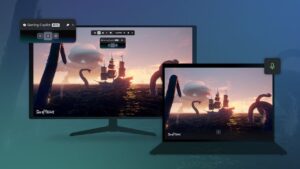
Microsoft has begun delivering a suite of new Windows 11 features that target gamers and accessibility users. The most prominent addition is Gaming Copilot, an AI‑powered assistant embedded in the Game Bar that offers voice‑based tips, achievement tracking and game recommendations. Other updates include a Network Quality Indicator for Xbox Cloud Gaming, improved sync for game saves, Wi‑Fi 7 support, a Braille viewer for Narrator, AI shortcuts in File Explorer, and a refreshed widgets panel. These changes aim to deepen AI integration across the OS while expanding its accessibility toolkit. Read more →

Microsoft Expands Copilot AI Features Across Windows 11 Insider Builds

Microsoft Expands Copilot AI Features Across Windows 11 Insider Builds
Microsoft is testing a suite of new AI-driven capabilities for Windows 11 through its Insider program. The updates include Copilot taking over the taskbar search area, answering plain‑language questions about system settings, and linking to the appropriate Settings pages. Additional features such as Copilot Connectors, document‑creation shortcuts, File Explorer AI actions, and Vision‑enabled document scanning are being trialed. While none of the changes are yet part of the publicly released Windows 11 25H2 update, the company appears to be applying lessons learned from earlier rollout challenges. Read more →

Microsoft Hints at Major Voice‑Driven Windows 11 Update

Microsoft Hints at Major Voice‑Driven Windows 11 Update
Microsoft’s official Windows account posted a cryptic message promising "something big" on Thursday, October 16, and hinted that it will give users’ hands a break. Executives David Weston and Pavan Davuluri have recently spoken about the future of Windows moving away from mouse and keyboard toward voice interaction. The tease aligns with existing Voice Access, voice dictation in Word, and AI‑powered features on Copilot+ PCs, suggesting a forthcoming major advancement in voice‑controlled Windows 11 functionality. Read more →

Microsoft Enhances AI Settings Agent in Windows 11 for Copilot+ PCs

Microsoft Enhances AI Settings Agent in Windows 11 for Copilot+ PCs
Microsoft has rolled out a new preview build of Windows 11 that expands the capabilities of its AI‑driven Settings agent, a feature reserved for Copilot+ PCs. The update adds more suggestion results when users search for settings, alerts users when a requested change cannot be applied, and surfaces recently used options on the Settings home panel. In addition, the Run command dialog now respects dark mode. These changes aim to make the AI assistant more helpful and intuitive for users, especially those less familiar with Windows configuration options. Read more →

Microsoft Tests AI‑Powered Auto‑Categorization in Windows 11 Photos App

Microsoft Tests AI‑Powered Auto‑Categorization in Windows 11 Photos App
Microsoft is trialing an AI feature for the Windows 11 Photos app that automatically groups images of receipts, screenshots, identity documents and handwritten notes into dedicated folders. The capability, available to Windows 11 Insiders on Copilot Plus PCs, identifies visual content without relying on text language, placing the new categories under the app’s left‑hand navigation. The test aims to streamline photo library management by reducing manual sorting, and Microsoft says the feature could expand to additional categories in the future. Read more →

Microsoft Launches Windows AI Labs to Accelerate AI Features in Windows 11, Starting with Paint

Microsoft Launches Windows AI Labs to Accelerate AI Features in Windows 11, Starting with Paint
Microsoft has introduced a new Windows AI Labs program that aims to speed up the development of artificial‑intelligence features for Windows 11. The pilot begins with the Paint app, offering a small group of testers early access to experimental AI tools. The initiative is separate from existing preview builds and focuses on rapid customer feedback regarding usability, interest, and market fit. While the sign‑up process is not yet functional, Microsoft says the program will expand to additional applications over time, aligning with its broader push to embed AI across the Windows ecosystem. Read more →

Windows 11 September Update Brings AI Enhancements and Minor Tweaks

Windows 11 September Update Brings AI Enhancements and Minor Tweaks
Microsoft’s September update for Windows 11 introduces a suite of new features, many of which are tied to the Copilot+ AI platform. Highlights include a new Recall homepage, expanded AI Agent in Settings, customizable lock‑screen widgets, improved search layout, and a corrected CPU usage display in Task Manager. Additional refinements address Click‑to‑Do tutorials, a refreshed Windows Hello design, larger clock options, and clearer permission prompts. The update’s size, roughly 4 GB, carries AI models even for devices without Copilot+, prompting concerns about download time and storage impact. Read more →

Google Launches Experimental Windows Search App to Rival Spotlight

Google Launches Experimental Windows Search App to Rival Spotlight
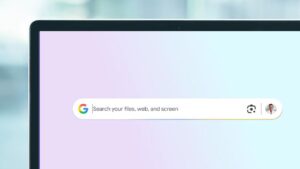
Google has introduced an experimental desktop search app for Windows that brings the company’s search expertise to the PC. The app can locate installed programs, local files, Google Drive items and web results, and includes Google Lens for on‑screen identification and translation. It is launched through Google’s Search Labs program and is accessed with the Alt + Space shortcut, mirroring macOS’s Spotlight. While still limited in availability and potentially buggy, the tool aims to provide a more powerful alternative to Windows’ built‑in search and third‑party utilities such as Everything. Read more →